 93bac360f1
- Add Dockerfile for multi-stage build with Node.js and Nginx - Create docker-compose.yml for simplified container deployment - Add .dockerignore to optimize Docker build context - Configure nginx.conf with performance and security optimizations - Update README.md and README_EN.md with Docker deployment instructions - Enhance database configuration to support optional Supabase integration - Improve environment configuration handling for local and containerized environments Enables easier deployment and provides a standardized container-based setup for the application. |
||
|---|---|---|
| history | ||
| public | ||
| rules | ||
| scripts | ||
| src | ||
| supabase/migrations | ||
| .dockerignore | ||
| .env.example | ||
| .gitignore | ||
| Dockerfile | ||
| LICENSE | ||
| README.md | ||
| README_EN.md | ||
| components.json | ||
| docker-compose.yml | ||
| index.html | ||
| nginx.conf | ||
| package.json | ||
| pnpm-lock.yaml | ||
| postcss.config.js | ||
| sgconfig.yml | ||
| tailwind.config.js | ||
| tsconfig.app.json | ||
| tsconfig.check.json | ||
| tsconfig.json | ||
| tsconfig.node.json | ||
| vite.config.ts | ||
README_EN.md
XCodeReviewer - Your Intelligent Code Audit Partner 🚀






XCodeReviewer is a modern code audit platform powered by Large Language Models (LLM), designed to provide developers with intelligent, comprehensive, and in-depth code quality analysis and review services.
🌟 Why Choose XCodeReviewer?
In the fast-paced world of software development, ensuring code quality is crucial. Traditional code audit tools are rigid and inefficient, while manual audits are time-consuming and labor-intensive. XCodeReviewer leverages the powerful capabilities of Google Gemini AI to revolutionize the way code reviews are conducted:
- 🤖 AI-Driven Deep Analysis: Beyond traditional static analysis, understands code intent and discovers deep logical issues.
- 🎯 Multi-dimensional, Comprehensive Assessment: From security, performance, maintainability to code style, providing 360-degree quality evaluation.
- 💡 Clear, Actionable Fix Suggestions: Innovative What-Why-How approach that not only tells you "what" the problem is, but also explains "why" and provides "how to fix" with specific code examples.
- ⚡ Real-time Feedback, Instant Improvement: Whether it's code snippets or entire repositories, get fast and accurate analysis results.
- ✨ Modern, Beautiful User Interface: Built with React + TypeScript, providing a smooth and intuitive user experience.
🎬 Project Demo
Main Feature Interfaces
📊 Intelligent Dashboard
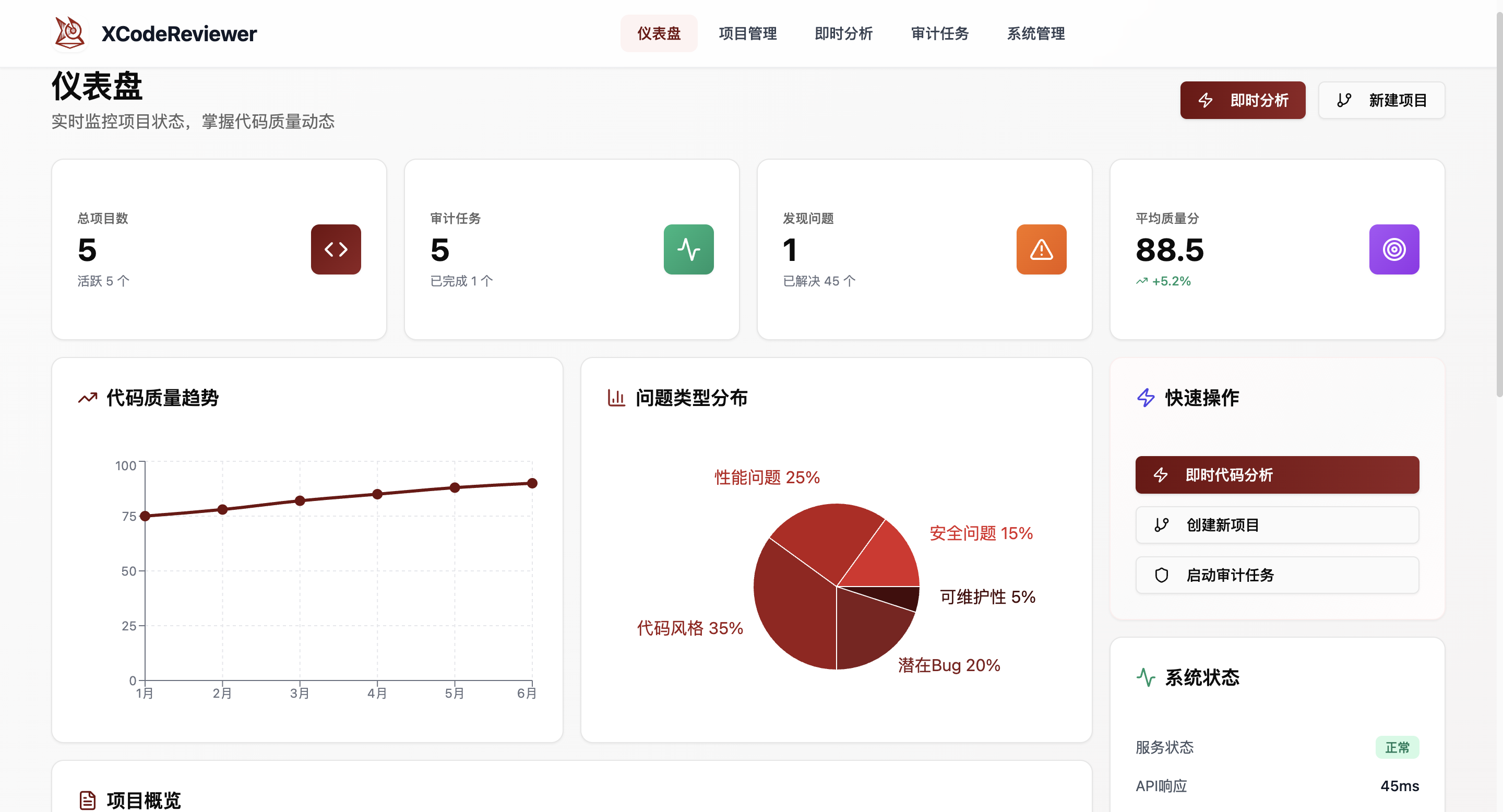 Real-time display of project statistics, quality trends, and system performance, providing comprehensive code audit overview
⚡ Instant Analysis
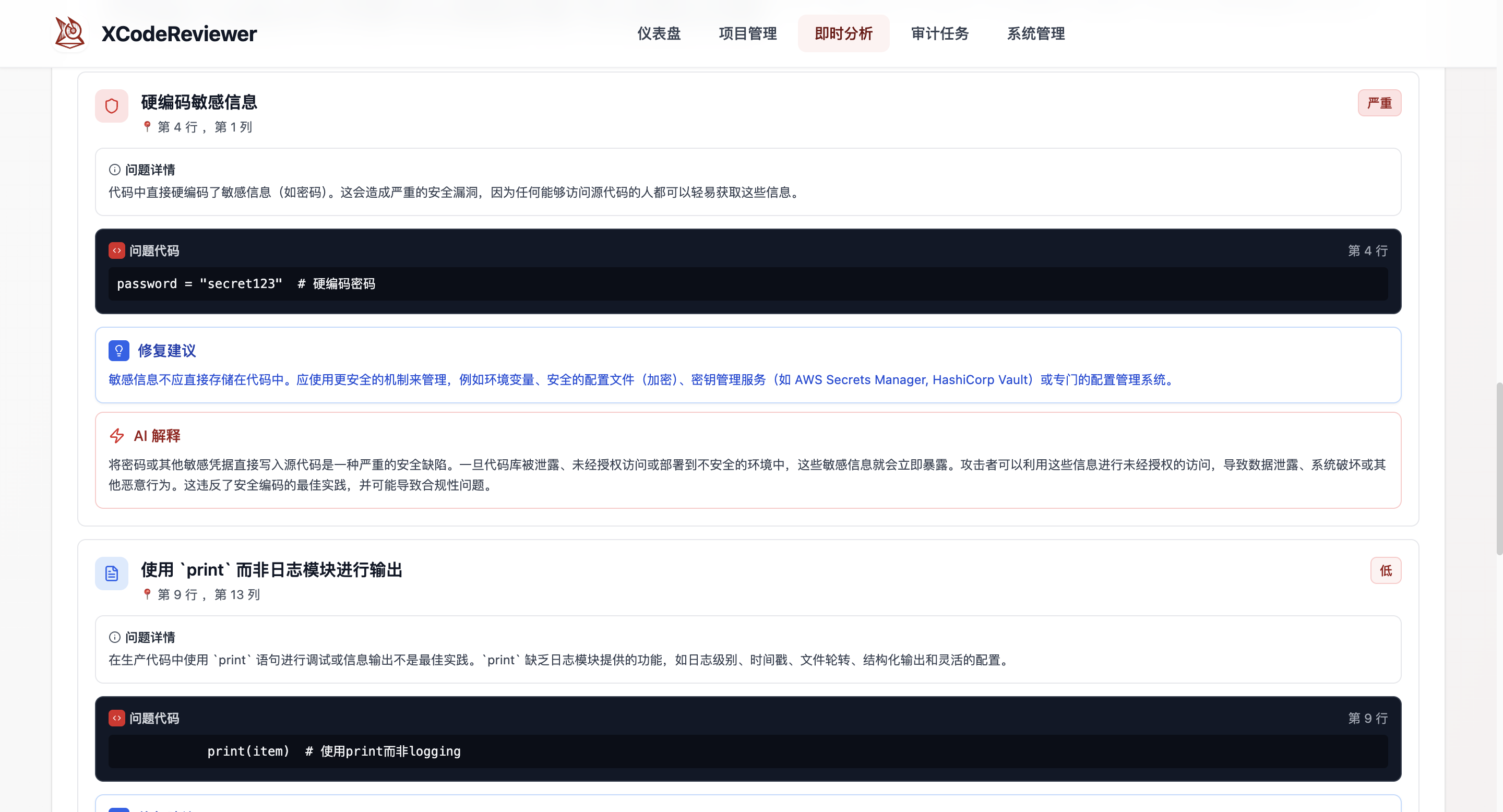 Support for quick code snippet analysis with detailed What-Why-How explanations and fix suggestions
🚀 Project Management
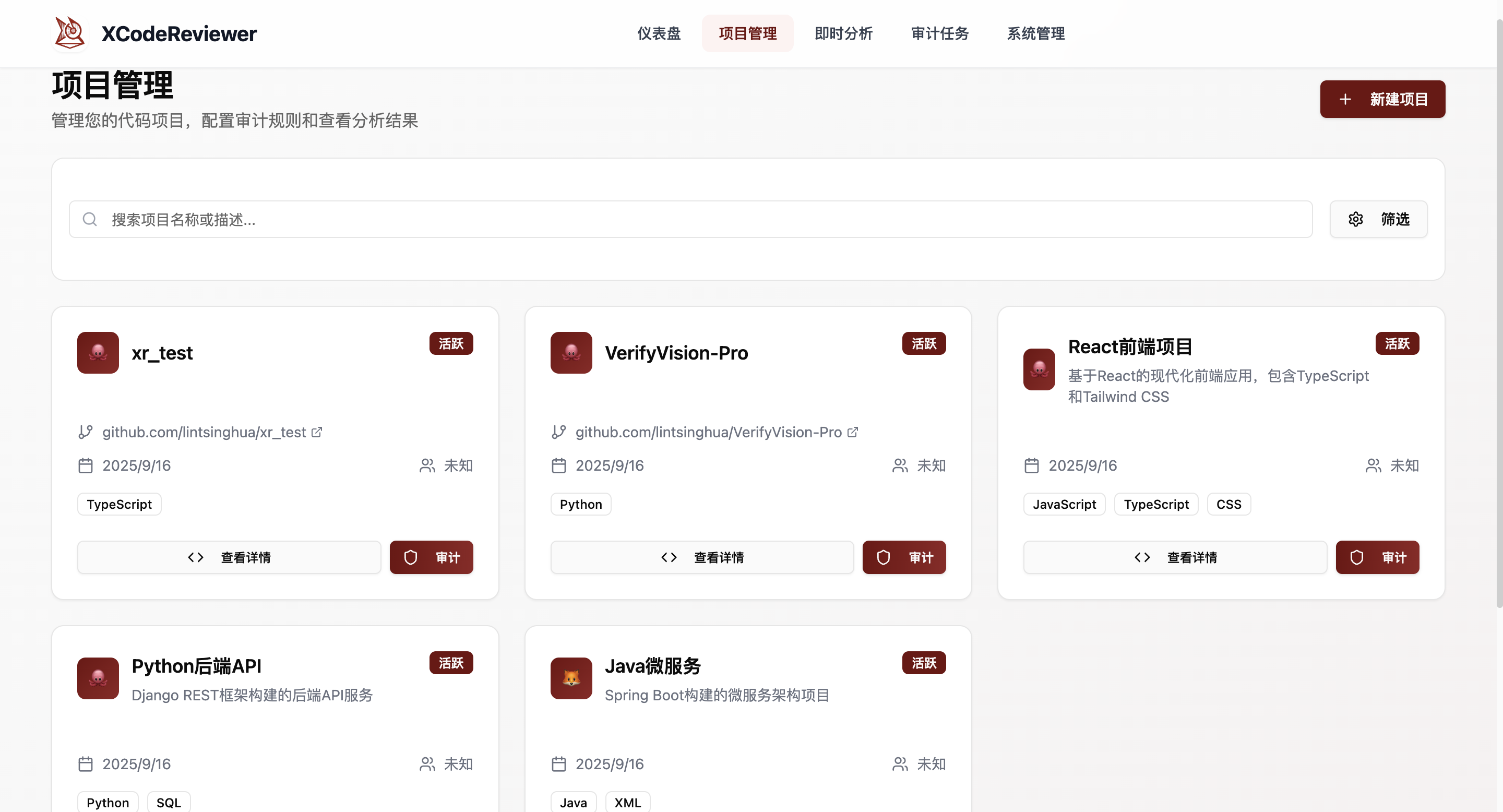 Integrated GitHub/GitLab repositories, supporting multi-language project audits and batch code analysis
🚀 Quick Start
🐳 Docker Deployment (Recommended)
Deploy quickly using Docker without Node.js environment setup.
-
Clone the project
git clone https://github.com/lintsinghua/XCodeReviewer.git cd XCodeReviewer -
Configure environment variables
cp .env.example .env # Edit .env file and set at least VITE_GEMINI_API_KEY -
Build and start
docker-compose build docker-compose up -d -
Access the application
Open
http://localhost:5174in your browser
Common commands:
docker-compose logs -f      # View logs
docker-compose restart      # Restart service
docker-compose down         # Stop service
💻 Local Development Deployment
For development or custom modifications, use local deployment.
Requirements
- Node.js:
18+ - pnpm:
8+(recommended) ornpm/yarn - Google Gemini API Key: For AI code analysis
Installation & Setup
-
Clone the project
git clone https://github.com/lintsinghua/XCodeReviewer.git cd XCodeReviewer -
Install dependencies
# Using pnpm (recommended) pnpm install # Or using npm npm install # Or using yarn yarn install -
Configure environment variables
# Copy environment template
cp .env.example .env
Edit the
.envfile and configure the necessary environment variables:# Google Gemini AI Configuration (Required) VITE_GEMINI_API_KEY=your_gemini_api_key_here VITE_GEMINI_MODEL=gemini-2.5-flash VITE_GEMINI_TIMEOUT_MS=25000 # Supabase Configuration (Optional, for data persistence) VITE_SUPABASE_URL=https://your-project.supabase.co VITE_SUPABASE_ANON_KEY=your-anon-key-here # GitHub Integration (Optional, for repository analysis) VITE_GITHUB_TOKEN=your_github_token_here # Application Configuration VITE_APP_ID=xcodereviewer # Analysis Configuration VITE_MAX_ANALYZE_FILES=40 VITE_LLM_CONCURRENCY=2 VITE_LLM_GAP_MS=500 -
Start development server
pnpm dev -
Access the application Open
http://localhost:5174in your browser
🔑 Getting API Keys
Google Gemini API Key
- Visit Google AI Studio
- Create a new API Key
- Add the API Key to
VITE_GEMINI_API_KEYin your.envfile
Supabase Configuration (Optional)
- Visit Supabase to create a new project
- Get the URL and anonymous key from project settings
- Run database migration scripts:
# Execute in Supabase SQL Editor cat supabase/migrations/full_schema.sql - If Supabase is not configured, the system will run in demo mode without data persistence
✨ Core Features
🚀 Project Management
- One-click Repository Integration: Seamlessly connect with GitHub, GitLab, and other mainstream platforms.
- Multi-language "Full Stack" Support: Covers popular languages like JavaScript, TypeScript, Python, Java, Go, Rust, and more.
- Flexible Branch Auditing: Support for precise analysis of specified code branches.
⚡ Instant Analysis
- Code Snippet "Quick Paste": Directly paste code in the web interface for immediate analysis results.
- 10+ Language Instant Support: Meet your diverse code analysis needs.
- Millisecond Response: Quickly get code quality scores and optimization suggestions.
🧠 Intelligent Auditing
- AI Deep Code Understanding: Based on Google Gemini, providing intelligent analysis beyond keyword matching.
- Five Core Detection Dimensions:
- 🐛 Potential Bugs: Precisely capture logical errors, boundary conditions, and null pointer issues.
- 🔒 Security Vulnerabilities: Identify SQL injection, XSS, sensitive information leakage, and other security risks.
- ⚡ Performance Bottlenecks: Discover inefficient algorithms, memory leaks, and unreasonable asynchronous operations.
- 🎨 Code Style: Ensure code follows industry best practices and unified standards.
- 🔧 Maintainability: Evaluate code readability, complexity, and modularity.
💡 Explainable Analysis (What-Why-How)
- What: Clearly identify problems in the code.
- Why: Detailed explanation of potential risks and impacts the problem may cause.
- How: Provide specific, directly usable code fix examples.
- Precise Code Location: Quickly jump to the problematic line and column.
📊 Visual Reports
- Code Quality Dashboard: Provides comprehensive quality assessment from 0-100, making code health status clear at a glance.
- Multi-dimensional Issue Statistics: Classify and count issues by type and severity.
- Quality Trend Analysis: Display code quality changes over time through charts.
🛠️ Tech Stack
| Category | Technology | Description |
|---|---|---|
| Frontend Framework | React 18 TypeScript Vite |
Modern frontend development stack with hot reload and type safety |
| UI Components | Tailwind CSS Radix UI Lucide React |
Responsive design, accessibility, rich icon library |
| Data Visualization | Recharts |
Professional chart library supporting multiple chart types |
| Routing | React Router v6 |
Single-page application routing solution |
| State Management | React Hooks Sonner |
Lightweight state management and notification system |
| AI Engine | Google Gemini 2.5 Flash |
Powerful large language model supporting code analysis |
| Backend Service | Supabase PostgreSQL |
Full-stack backend-as-a-service with real-time database |
| HTTP Client | Axios Ky |
Modern HTTP request libraries |
| Code Quality | Biome Ast-grep TypeScript |
Code formatting, static analysis, and type checking |
| Build Tools | Vite PostCSS Autoprefixer |
Fast build tools and CSS processing |
📁 Project Structure
XCodeReviewer/
├── src/
│   ├── app/                # Application configuration
│   │   ├── App.tsx         # Main application component
│   │   ├── main.tsx        # Application entry point
│   │   └── routes.tsx      # Route configuration
│   ├── components/         # React components
│   │   ├── layout/         # Layout components (Header, Footer, PageMeta)
│   │   ├── ui/             # UI component library (based on Radix UI)
│   │   └── debug/          # Debug components
│   ├── pages/              # Page components
│   │   ├── Dashboard.tsx   # Dashboard
│   │   ├── Projects.tsx    # Project management
│   │   ├── InstantAnalysis.tsx # Instant analysis
│   │   ├── AuditTasks.tsx  # Audit tasks
│   │   └── AdminDashboard.tsx # System management
│   ├── features/           # Feature modules
│   │   ├── analysis/       # Analysis related services
│   │   │   └── services/   # AI code analysis engine
│   │   └── projects/       # Project related services
│   │       └── services/   # Repository scanning, ZIP file scanning
│   ├── shared/             # Shared utilities
│   │   ├── config/         # Configuration files (database, environment)
│   │   ├── types/          # TypeScript type definitions
│   │   ├── hooks/          # Custom React Hooks
│   │   ├── utils/          # Utility functions
│   │   └── constants/      # Constants definition
│   └── assets/             # Static assets
│       └── styles/         # Style files
├── supabase/
│   └── migrations/         # Database migration files
├── public/
│   └── images/             # Image resources
├── scripts/                # Build and setup scripts
└── rules/                  # Code rules configuration
🎯 Usage Guide
Instant Code Analysis
- Visit the
/instant-analysispage - Select programming language (supports 10+ languages)
- Paste code or upload file
- Click "Start Analysis" to get AI analysis results
- View detailed issue reports and fix suggestions
Project Management
- Visit the
/projectspage - Click "New Project" to create a project
- Configure repository URL and scan parameters
- Start code audit task
- View audit results and issue statistics
Audit Tasks
- Create audit tasks in project detail page
- Select scan branch and exclusion patterns
- Configure analysis depth and scope
- Monitor task execution status
- View detailed issue reports
Build and Deploy
# Development mode
pnpm dev

# Build production version
pnpm build

# Preview build results
pnpm preview

# Code linting
pnpm lint
Environment Variables
| Variable | Required | Description |
|---|---|---|
VITE_GEMINI_API_KEY |
✅ | Google Gemini API key |
VITE_GEMINI_MODEL |
❌ | AI model name (default: gemini-2.5-flash) |
VITE_GEMINI_TIMEOUT_MS |
❌ | Request timeout (default: 25000ms) |
VITE_SUPABASE_URL |
❌ | Supabase project URL |
VITE_SUPABASE_ANON_KEY |
❌ | Supabase anonymous key |
VITE_APP_ID |
❌ | Application identifier (default: xcodereviewer) |
VITE_MAX_ANALYZE_FILES |
❌ | Maximum files to analyze (default: 40) |
VITE_LLM_CONCURRENCY |
❌ | LLM concurrency limit (default: 2) |
VITE_LLM_GAP_MS |
❌ | Gap between LLM requests (default: 500ms) |
🤝 Contributing
We warmly welcome all forms of contributions! Whether it's submitting issues, creating PRs, or improving documentation, every contribution is important to us. Please contact us for detailed information.
Development Workflow
- Fork this project
- Create your feature branch (
git checkout -b feature/AmazingFeature) - Commit your changes (
git commit -m 'Add some AmazingFeature') - Push to the branch (
git push origin feature/AmazingFeature) - Create a Pull Request
🙏 Acknowledgments
- Google Gemini AI: Providing powerful AI analysis capabilities
- Supabase: Providing convenient backend-as-a-service support
- Radix UI: Providing accessible UI components
- Tailwind CSS: Providing modern CSS framework
- Recharts: Providing professional chart components
- And all the authors of open source software used in this project!
📞 Contact Us
- Project Link: https://github.com/lintsinghua/XCodeReviewer
- Issue Reports: Issues
- Author Email: tsinghuaiiilove@gmail.com
⭐ If this project helps you, please give us a Star! Your support is our motivation to keep moving forward!
[](https://star-history.com/#lintsinghua/XCodeReview